# Register
If it's the first time you come to Nestor, please click on the **REGISTER** button at the top.
[](https://doc.nestor-edp.org/uploads/images/gallery/2023-01/DOpYBZ0UirYKldS2-image.png)
Enter the requested information.
[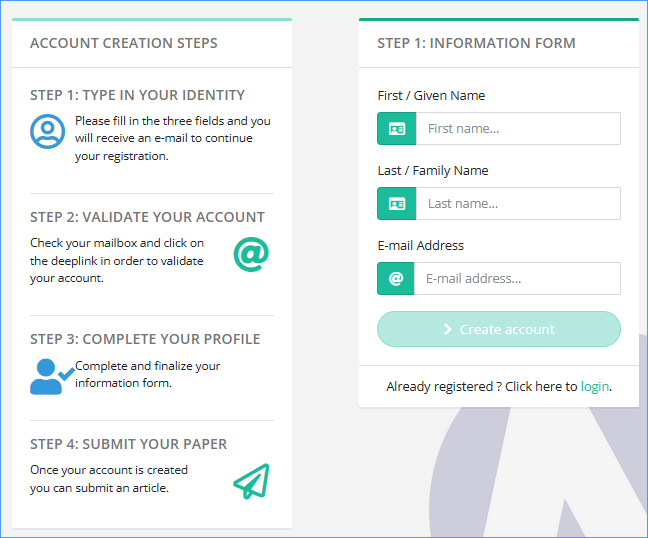](https://doc.nestor-edp.org/uploads/images/gallery/2023-01/JS9cVAAPohT1X2Nd-image.png)
You will then receive an e-mail containing a deeplink. Click (or copy and paste) this link and complete your information, i.e. choose a password and provide your affiliation.
[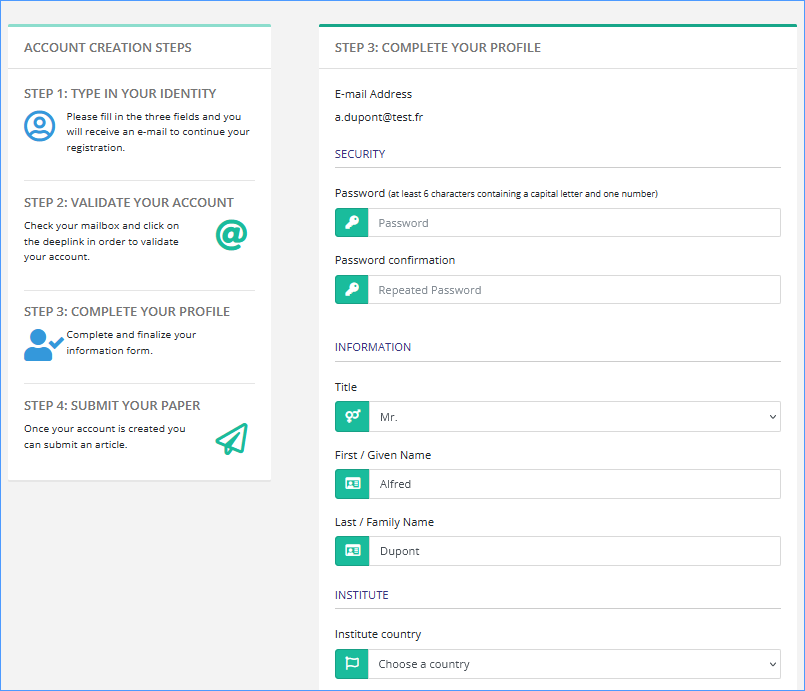](https://doc.nestor-edp.org/uploads/images/gallery/2023-01/S70d1qzMskTQdc5j-image.png)
If you are an author or a referee already registered in MMS, **do not register again**, but please click on the ‘Reset password’ link [https://XXXX.nestor-edp.org/resetPassword](https://xxxx.nestor-edp.org/resetPassword) (or available in the Login page).
For editors previously using MMS, your codes have been migrated, **do not register again**. Type in your e-mail address (the one used with MMS) and the password you used to access MMS. If you got some connection problem, please click on the ‘Reset password’ link' [https://XXXX.nestor-edp.org/resetPassword](https://xxxx.nestor-edp.org/resetPassword)