# Login

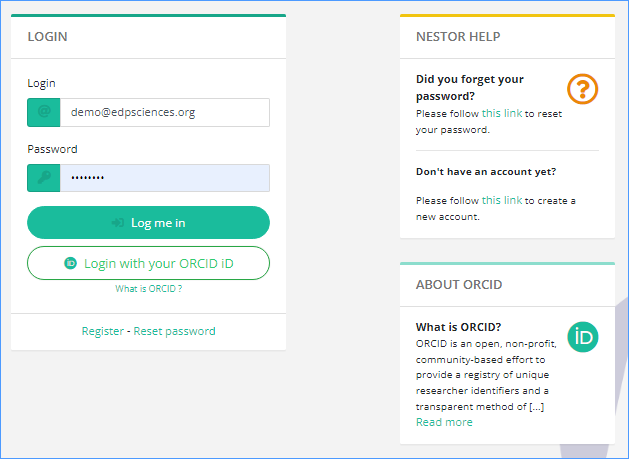
<span lang="EN-US" style="mso-bidi-font-family: Calibri;"><span lang="EN-US" style="font-size: 11.0pt; font-family: 'Calibri',sans-serif; mso-fareast-font-family: 'Times New Roman'; mso-ansi-language: EN-US; mso-fareast-language: EN-US; mso-bidi-language: EN-US;">From</span> <span lang="EN-US" style="font-size: 11.0pt; font-family: 'Calibri',sans-serif; mso-fareast-font-family: 'Times New Roman'; mso-bidi-font-family: 'Times New Roman'; mso-ansi-language: EN-US; mso-fareast-language: EN-US; mso-bidi-language: EN-US;">[<span style="mso-bidi-font-family: Calibri;">https://xxxxx.nestor-edp.org/ </span>](https://xxxxx.nestor-edp.org/)</span></span><span lang="EN-US" style="mso-bidi-font-family: Calibri;">, click on the **LOGIN** button at the top. </span><span class="TextRun SCXW258431972 BCX0" data-contrast="auto" lang="EN-US" style="margin: 0px; padding: 0px; user-select: text; -webkit-user-drag: none; -webkit-tap-highlight-color: transparent; font-variant-ligatures: none !important; font-size: 11pt; line-height: 19.425px; font-family: Calibri, Calibri_EmbeddedFont, Calibri_MSFontService, sans-serif;" xml:lang="EN-US"><span class="NormalTextRun SCXW258431972 BCX0" style="margin: 0px; padding: 0px; user-select: text; -webkit-user-drag: none; -webkit-tap-highlight-color: transparent;">Y</span><span class="NormalTextRun SCXW258431972 BCX0" style="margin: 0px; padding: 0px; user-select: text; -webkit-user-drag: none; -webkit-tap-highlight-color: transparent;">ou will be requested to enter your </span><span class="NormalTextRun SCXW258431972 BCX0" style="margin: 0px; padding: 0px; user-select: text; -webkit-user-drag: none; -webkit-tap-highlight-color: transparent;">e-mail</span><span class="NormalTextRun SCXW258431972 BCX0" style="margin: 0px; padding: 0px; user-select: text; -webkit-user-drag: none; -webkit-tap-highlight-color: transparent;"> and password.</span></span>

<span class="TextRun SCXW258431972 BCX0" data-contrast="auto" lang="EN-US" style="margin: 0px; padding: 0px; user-select: text; -webkit-user-drag: none; -webkit-tap-highlight-color: transparent; font-variant-ligatures: none !important; font-size: 11pt; line-height: 19.425px; font-family: Calibri, Calibri_EmbeddedFont, Calibri_MSFontService, sans-serif;" xml:lang="EN-US"><span class="NormalTextRun SCXW258431972 BCX0" style="margin: 0px; padding: 0px; user-select: text; -webkit-user-drag: none; -webkit-tap-highlight-color: transparent;"><span class="WACImageContainer NoPadding BlobObject SCXW258431972 BCX0" role="presentation" style="margin: 0px; padding: 0px; user-select: text; -webkit-user-drag: none; -webkit-tap-highlight-color: transparent; position: relative; cursor: move; left: 0px; top: 2px; display: inline-block; text-indent: 0px; width: 396px; height: 291px; transform: rotate(0deg);">![](https://doc.nestor-edp.org/uploads/images/gallery/2023-01/e08RNpgJaCWh3Lhu-embedded-image-agfcllgn.png)</span></span></span>

Depending on the following priorities, you will either land on the author, referee or editor dashboard:

- If you are editor of the journal, you will always land on the editor dashboard
- Otherwise, if you have pending articles as referee, landing on the referee dashboard
- Otherwise, if you have active articles as author, landing on the author dashboard
- Otherwise, if you have active articles as coauthor, landing on the coauthor dashboard
- If none of the above apply, you will land on the author dashboard.

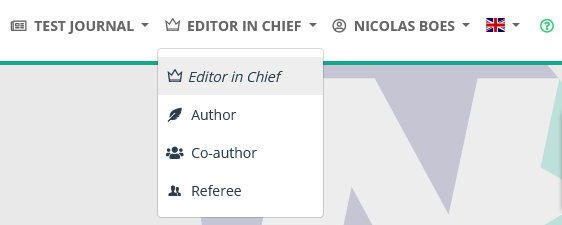
Switching dasboard is done via the selection menu in the upper right:

[![image.png](https://doc.nestor-edp.org/uploads/images/gallery/2026-09/scaled-1680-/GmaKR7eVgpITguUY-image.png)](https://doc.nestor-edp.org/uploads/images/gallery/2026-09/GmaKR7eVgpITguUY-image.png)