# The editor tells me he cannot perform an action. How can I see his interface and help troubleshoot it?

Administrators are allowed to log in as another user and perform actions on his/her behalf.

This allows the administrator to see exactly what the users experience, and helps to quickly troubleshoot problems. Note that users' passwords are crypted and remain undisclosed to the administrator.

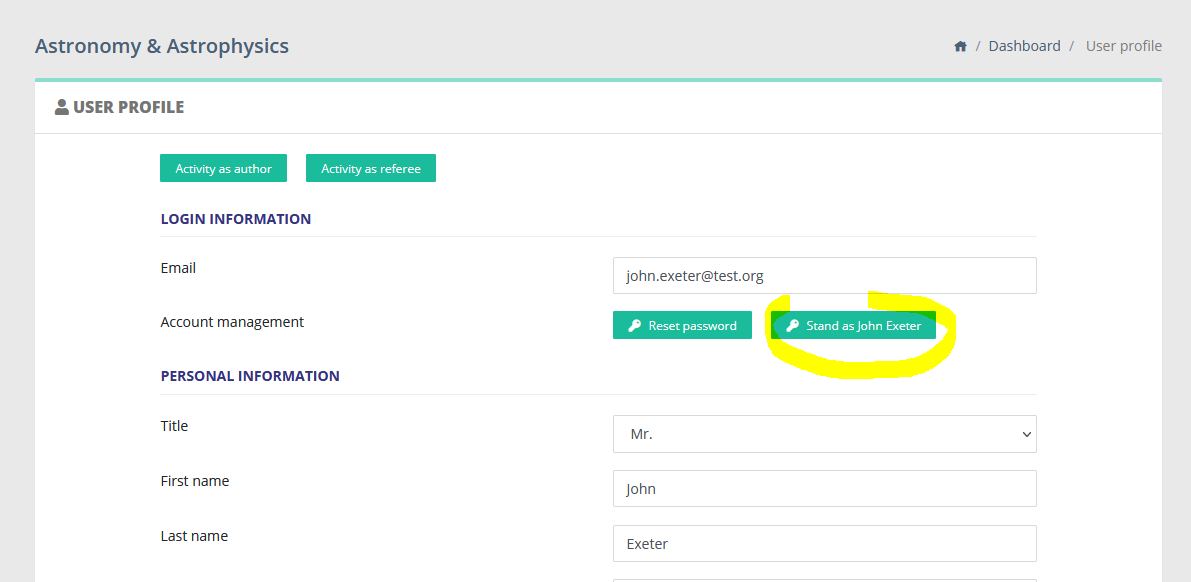
The feature is available to the administrator via each user page. When clicking on a Nestor user, the administrator has access to this button:

[![image.png](https://doc.nestor-edp.org/uploads/images/gallery/2023-01/scaled-1680-/1GLyecPJK7p4F4gM-image.png)](https://doc.nestor-edp.org/uploads/images/gallery/2023-01/1GLyecPJK7p4F4gM-image.png)
<div data-layout="center" data-node-type="mediaSingle" data-width="" id="bkmrk--1"><div data-alt="" data-collection="contentId-2057895937" data-context-id="2057895937" data-file-mime-type="image/png" data-file-name="user2.PNG" data-file-size="28154" data-height="437" data-id="0ef91914-c1be-434f-912e-f695f9827935" data-node-type="media" data-type="file" data-width="893" style="display: inline-block; border-radius: 3px; background: #EBECF0; box-shadow: 0 1px 1px rgba(9, 30, 66, 0.2), 0 0 1px 0 rgba(9, 30, 66, 0.24);" title="Attachment">  
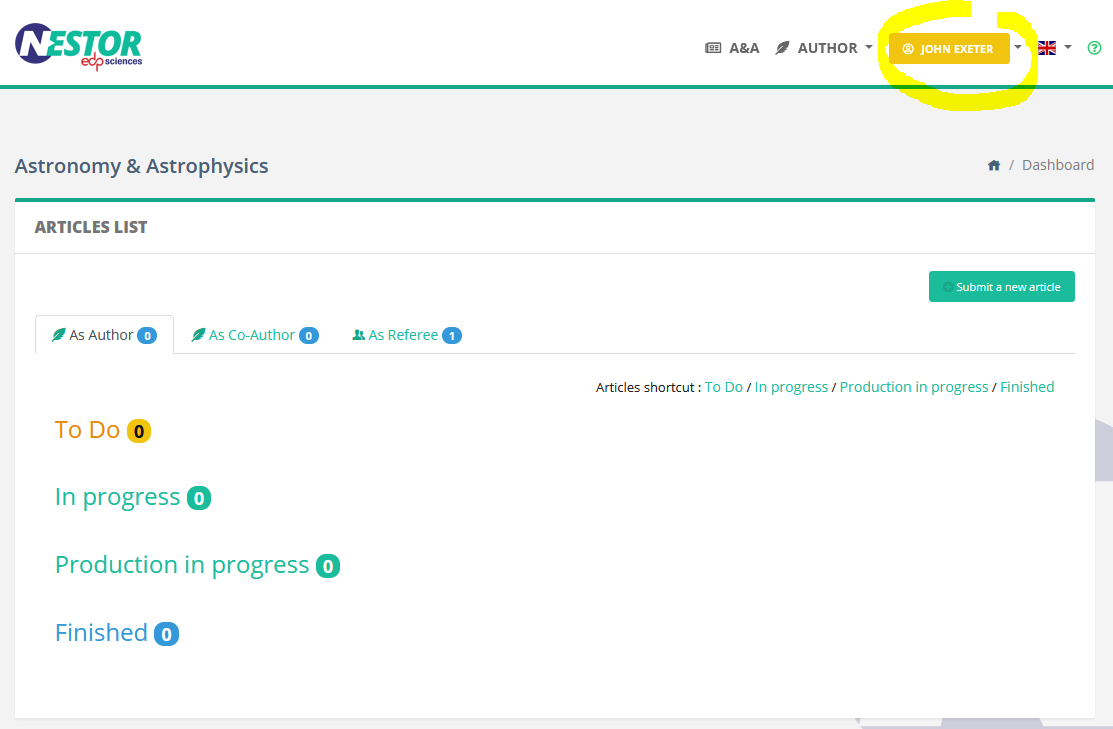
</div></div>Clicking this button connects the administrator with this user account:

[![image.png](https://doc.nestor-edp.org/uploads/images/gallery/2023-01/scaled-1680-/B57NfDrxMO2fVtnC-image.png)](https://doc.nestor-edp.org/uploads/images/gallery/2023-01/B57NfDrxMO2fVtnC-image.png)
<div data-layout="center" data-node-type="mediaSingle" data-width="" id="bkmrk--3"><div data-alt="" data-collection="contentId-2057895937" data-context-id="2057895937" data-file-mime-type="image/png" data-file-name="user3.PNG" data-file-size="41435" data-height="547" data-id="1fd01832-13c1-4c0f-9a98-4069470e8af6" data-node-type="media" data-type="file" data-width="835" style="display: inline-block; border-radius: 3px; background: #EBECF0; box-shadow: 0 1px 1px rgba(9, 30, 66, 0.2), 0 0 1px 0 rgba(9, 30, 66, 0.24);" title="Attachment">  
</div></div>From that point on, the administrator can execute actions on behalf of this user.

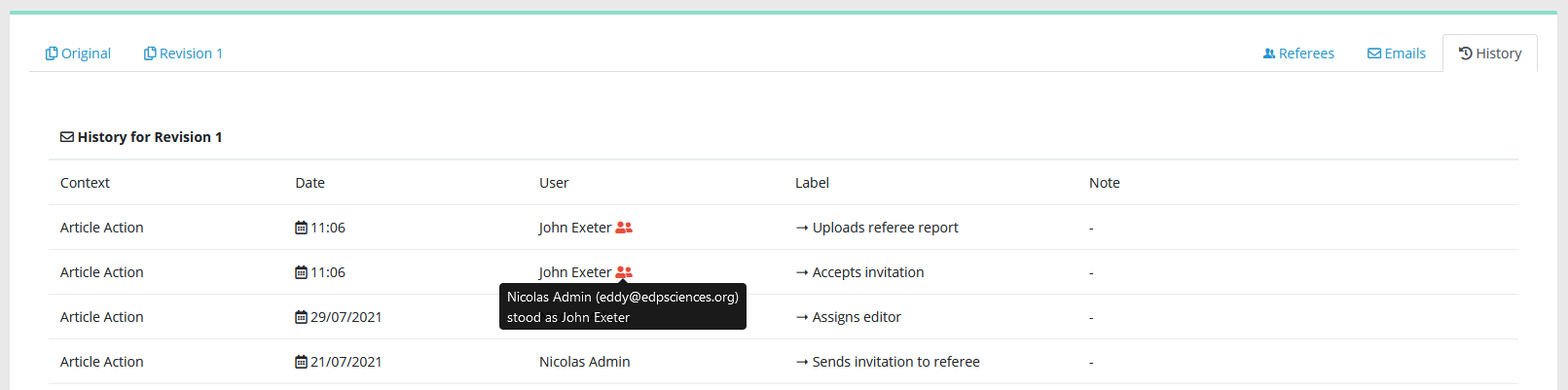
Any action recorded in the article history will appear as executed by the impersonated user, with a special note:

[![image.png](https://doc.nestor-edp.org/uploads/images/gallery/2023-01/scaled-1680-/MAyvj8i1agNqzDMA-image.png)](https://doc.nestor-edp.org/uploads/images/gallery/2023-01/MAyvj8i1agNqzDMA-image.png)
<div data-layout="center" data-node-type="mediaSingle" data-width="100" id="bkmrk--6"><div data-alt="" data-collection="contentId-2057895937" data-context-id="2057895937" data-file-mime-type="image/png" data-file-name="123.png" data-file-size="40716" data-height="96" data-id="85348a34-ee64-41b0-8d91-5da99ad13102" data-node-type="media" data-type="file" data-width="387" style="display: inline-block; border-radius: 3px; background: #EBECF0; box-shadow: 0 1px 1px rgba(9, 30, 66, 0.2), 0 0 1px 0 rgba(9, 30, 66, 0.24);" title="Attachment">  
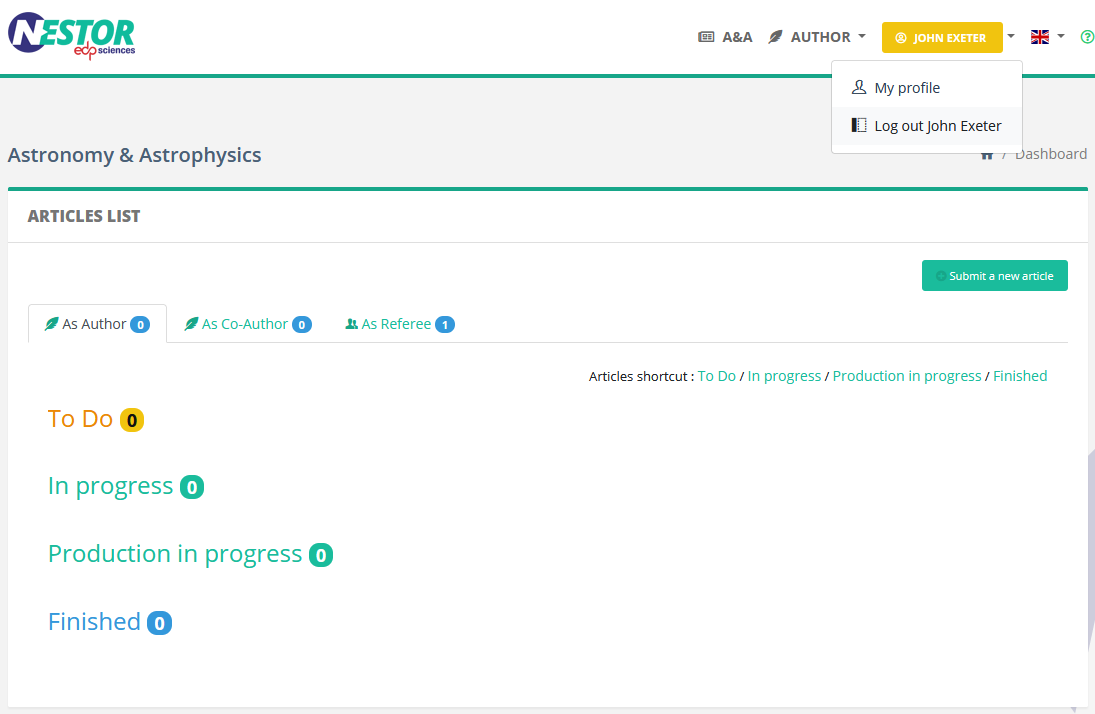
</div></div>To leave the user account, the administrator simply has to log out as usual. He will be redirected to his own account:

[![image.png](https://doc.nestor-edp.org/uploads/images/gallery/2023-01/scaled-1680-/uzirZfoCf4ZqhhsW-image.png)](https://doc.nestor-edp.org/uploads/images/gallery/2023-01/uzirZfoCf4ZqhhsW-image.png)
<div data-layout="center" data-node-type="mediaSingle" data-width="100" id="bkmrk--9"><div data-alt="" data-collection="contentId-2057895937" data-context-id="2057895937" data-file-mime-type="image/png" data-file-name="logout.png" data-file-size="55971" data-height="171" data-id="789dda31-a181-49af-b77a-abada999dac0" data-node-type="media" data-type="file" data-width="263" style="display: inline-block; border-radius: 3px; background: #EBECF0; box-shadow: 0 1px 1px rgba(9, 30, 66, 0.2), 0 0 1px 0 rgba(9, 30, 66, 0.24);" title="Attachment">  
</div></div>