# Configuration of article submission

The submission workflow is the most technical configuration! At the minimum, we recommend to follow the following steps, hang in there:

- File type configuration
- Article type configuration
- Submission instructions configuration

---

#### The file type configuration

The first step is the file type configuration, where file types are listed, and may be created, updated, or deleted:

[![image.png](https://doc.nestor-edp.org/uploads/images/gallery/2023-01/scaled-1680-/baBXxF1KIdQkDh5y-image.png)](https://doc.nestor-edp.org/uploads/images/gallery/2023-01/baBXxF1KIdQkDh5y-image.png)

<div data-layout="center" data-node-type="mediaSingle" data-width="" id="bkmrk--1"><div data-alt="" data-collection="contentId-408027179" data-context-id="408027179" data-file-mime-type="image/png" data-file-name="Screenshot_2020-04-22 EDP NESTOR File Types.png" data-file-size="295330" data-height="718" data-id="6a7d0348-c1ee-4581-9bc7-9d643aab566c" data-node-type="media" data-type="file" data-width="1385" style="display: inline-block; border-radius: 3px; background: #EBECF0; box-shadow: 0 1px 1px rgba(9, 30, 66, 0.2), 0 0 1px 0 rgba(9, 30, 66, 0.24);" title="Attachment">  
</div></div>Clicking on “Edit file type” will get you to the file type configuration, where the following fields may be edited:

- Name
- Visibility by users (editors and referees)
- Whether this file type will be sent to production systems when the article is accepted

[![image.png](https://doc.nestor-edp.org/uploads/images/gallery/2023-01/scaled-1680-/orb2MovkgIoUTLrZ-image.png)](https://doc.nestor-edp.org/uploads/images/gallery/2023-01/orb2MovkgIoUTLrZ-image.png)

<div data-alt="" data-collection="contentId-408027179" data-context-id="408027179" data-file-mime-type="image/png" data-file-name="Screenshot_2020-04-22 EDP NESTOR Editor Dashboard.png" data-file-size="60491" data-height="658" data-id="1ce3f15f-47e8-4aed-92ed-bbb132684666" data-node-type="media" data-type="file" data-width="1381" id="bkmrk--2" style="display: inline-block; border-radius: 3px; background: #EBECF0; box-shadow: 0 1px 1px rgba(9, 30, 66, 0.2), 0 0 1px 0 rgba(9, 30, 66, 0.24);" title="Attachment">  
</div><div data-alt="" data-collection="contentId-408027179" data-context-id="408027179" data-file-mime-type="image/png" data-file-name="Screenshot_2020-04-22 EDP NESTOR Editor Dashboard.png" data-file-size="60491" data-height="658" data-id="1ce3f15f-47e8-4aed-92ed-bbb132684666" data-node-type="media" data-type="file" data-width="1381" id="bkmrk--4" style="display: inline-block; border-radius: 3px; background: #EBECF0; box-shadow: 0 1px 1px rgba(9, 30, 66, 0.2), 0 0 1px 0 rgba(9, 30, 66, 0.24);" title="Attachment"></div><div data-alt="" data-collection="contentId-408027179" data-context-id="408027179" data-file-mime-type="image/png" data-file-name="Screenshot_2020-04-22 EDP NESTOR Editor Dashboard.png" data-file-size="60491" data-height="658" data-id="1ce3f15f-47e8-4aed-92ed-bbb132684666" data-node-type="media" data-type="file" data-width="1381" id="bkmrk--5" style="display: inline-block; border-radius: 3px; background: #EBECF0; box-shadow: 0 1px 1px rgba(9, 30, 66, 0.2), 0 0 1px 0 rgba(9, 30, 66, 0.24);" title="Attachment"></div><div data-alt="" data-collection="contentId-408027179" data-context-id="408027179" data-file-mime-type="image/png" data-file-name="Screenshot_2020-04-22 EDP NESTOR Editor Dashboard.png" data-file-size="60491" data-height="658" data-id="1ce3f15f-47e8-4aed-92ed-bbb132684666" data-node-type="media" data-type="file" data-width="1381" id="bkmrk--6" style="display: inline-block; border-radius: 3px; background: #EBECF0; box-shadow: 0 1px 1px rgba(9, 30, 66, 0.2), 0 0 1px 0 rgba(9, 30, 66, 0.24);" title="Attachment"></div>---

#### The article type configuration

The second step is the [article type configuratio](https://doc.nestor-edp.org/books/editorial-office-guide/page/configuration-of-article-types "Configuration of article types")n, where specific file types may be requested to the author at submission or revision, for a specific article type.

- Depending on the article type, you may want to require specific files. For example, a cover letter from the authors may not be requested for a preface article.
- In a given article type, depending on the first submission or a revised submission, you may want to require specific files. For example, a first submission will never require a reply to the referee, while a revised version will often need a reply to the referee.

Thus, for any given article type, this behavior is defined here:

[![image.png](https://doc.nestor-edp.org/uploads/images/gallery/2023-01/scaled-1680-/eGx5xmA4RZBA3QPF-image.png)](https://doc.nestor-edp.org/uploads/images/gallery/2023-01/eGx5xmA4RZBA3QPF-image.png)

<div data-layout="center" data-node-type="mediaSingle" data-width="" id="bkmrk--9"><div data-alt="" data-collection="contentId-408027179" data-context-id="408027179" data-file-mime-type="image/png" data-file-name="Screenshot_2020-04-22 EDP NESTOR Editor Dashboard(1).png" data-file-size="299739" data-height="822" data-id="171e7ff3-073e-4262-ab5e-8ce52d915cfc" data-node-type="media" data-type="file" data-width="1346" style="display: inline-block; border-radius: 3px; background: #EBECF0; box-shadow: 0 1px 1px rgba(9, 30, 66, 0.2), 0 0 1px 0 rgba(9, 30, 66, 0.24);" title="Attachment">  
</div></div>---

#### The submission instructions configuration

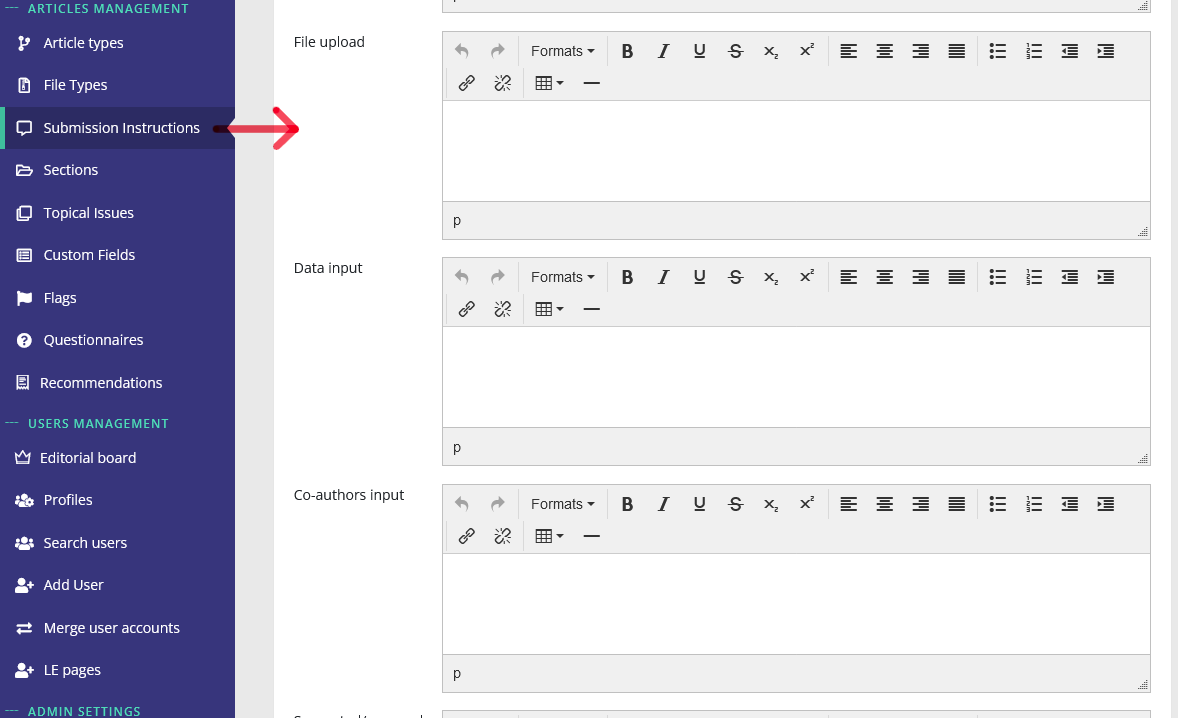
During the submission process, the author may be guided during each step of the submission.

For this purpose, you may configure specific instructions here:

[![image.png](https://doc.nestor-edp.org/uploads/images/gallery/2023-05/scaled-1680-/dZnYFKCpWxr4VrAT-image.png)](https://doc.nestor-edp.org/uploads/images/gallery/2023-05/dZnYFKCpWxr4VrAT-image.png)