# FAQ

---

##### **I cannot send my decision on this article, why?**

If the buttons are unavailable in the [decision module](https://doc.nestor-edp.org/books/editor-guide/page/the-editorial-decision-module), this means either the status of the article does not allow a decision, or your profile does not have the right to take the decision.

Most of the time, this is caused by the status, typically these two statuses will lock the editorial decision:

- **Revision in progress (with author)**
- **Peer review in progress (with referee)**

This is a feature ensuring the author or referee(s) complete their pending tasks. To unlock the decision, you must either:

- wait for them to complete the task (or do it on their behalf)
- or cancel the task ([revert decision](https://doc.nestor-edp.org/books/release-notes/page/410-co-author-search-revert-actions#bkmrk---revert-actions-hav) / [cancel referee](https://doc.nestor-edp.org/books/editor-guide/page/managing-invited-referees))

---

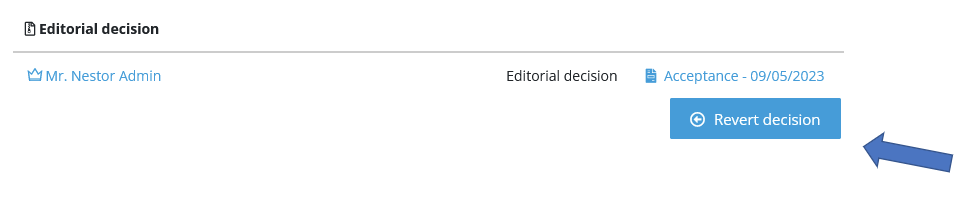
##### **I made a mistake when sending the decision, how can I cancel and resend it?**

You must first revert your previous decision! This is done via the [decision module](https://doc.nestor-edp.org/books/editor-guide/page/the-editorial-decision-module):

[![image.png](https://doc.nestor-edp.org/uploads/images/gallery/2023-05/scaled-1680-/4AeOonsW34Wc5d7K-image.png)](https://doc.nestor-edp.org/uploads/images/gallery/2023-05/4AeOonsW34Wc5d7K-image.png)
---

##### **When sending a message, I can only enclose one file, why?**

Spam filters are sensitive about enclosures. To preserve our sender address reputation, we have implemented the following safeguards:

- Limit the **number** of files enclosed to an e-mail
- Limit the **size** of enclosed files
- Limit the hourly volume of sent e-mails

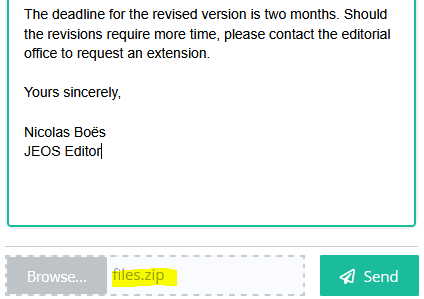
To enclose several files, three methods are at your disposal:

1\. The simplest method is to [zip the files](https://www.reddit.com/r/MacOS/comments/14g1zds/how_can_i_editzipunzip_in_the_fileopen_window_on/) and upload the zip here:

[![image.png](https://doc.nestor-edp.org/uploads/images/gallery/2025-09/scaled-1680-/CYo7KIlfzUsiJIc9-image.png)](https://doc.nestor-edp.org/uploads/images/gallery/2025-09/CYo7KIlfzUsiJIc9-image.png)
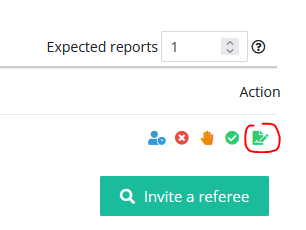
2\. Another straightforward solution is to assign yourself as referee and upload the files in the report form. This will insert a link in your decision, that the author can simply click to download the files.
<div id="bkmrk--6" style="font-family: Aptos, Aptos_EmbeddedFont, Aptos_MSFontService, Calibri, Helvetica, sans-serif; font-size: 11pt; color: rgb(0, 0, 0);">![](https://doc.nestor-edp.org/uploads/images/gallery/2025-09/eTaPWTUkr1pfVkJY-embedded-image-phzrijef.png)</div><div id="bkmrk--7" style="font-family: Aptos, Aptos_EmbeddedFont, Aptos_MSFontService, Calibri, Helvetica, sans-serif; font-size: 11pt; color: rgb(0, 0, 0);">  
</div>3\. An alternate solution is to upload the files in the [file management module](https://doc.nestor-edp.org/books/editor-guide/page/the-file-management-module), and refer the author to it. Check with your editorial office that [file types](https://doc.nestor-edp.org/books/editorial-office-guide/page/configuration-of-file-types) are properly configured and ensure the author has access to it.

---

##### **How can I correct my e-mail address and personal information?**<span style="color: rgb(0, 0, 0);">  
</span>

<span class="TextRun SCXW14624660 BCX0" data-contrast="auto" lang="EN-US" style="margin: 0px; padding: 0px; user-select: text; -webkit-user-drag: none; -webkit-tap-highlight-color: transparent; font-variant-ligatures: none !important; font-size: 11pt; line-height: 19.425px; font-family: Calibri, Calibri_EmbeddedFont, Calibri_MSFontService, sans-serif;" xml:lang="EN-US">C<span class="NormalTextRun SCXW14624660 BCX0" style="margin: 0px; padding: 0px; user-select: text; -webkit-user-drag: none; -webkit-tap-highlight-color: transparent;">lick on your name and on ‘My profile’</span><span class="NormalTextRun SCXW14624660 BCX0" style="margin: 0px; padding: 0px; user-select: text; -webkit-user-drag: none; -webkit-tap-highlight-color: transparent;">:</span></span>

<span class="WACImageContainer NoPadding BlobObject SCXW14624660 BCX0" role="presentation" style="margin: 0px; padding: 0px; user-select: text; -webkit-user-drag: none; -webkit-tap-highlight-color: transparent; position: relative; cursor: move; left: 0px; top: 2px; display: inline-block; text-indent: 0px; width: 306px; height: 131px; transform: rotate(0deg);">![](https://doc.nestor-edp.org/uploads/images/gallery/2023-01/WSNxySLGhg1bSHKE-embedded-image-bcpwsizs.png)</span><span class="EOP SCXW14624660 BCX0" data-ccp-props="{"201341983":0,"335551550":6,"335551620":6,"335559739":0,"335559740":259}" style="margin: 0px; padding: 0px; user-select: text; -webkit-user-drag: none; -webkit-tap-highlight-color: transparent; font-size: 11pt; line-height: 19.425px; font-family: Calibri, Calibri_EmbeddedFont, Calibri_MSFontService, sans-serif;"> </span>

<span class="EOP SCXW14624660 BCX0" data-ccp-props="{"201341983":0,"335551550":6,"335551620":6,"335559739":0,"335559740":259}" style="margin: 0px; padding: 0px; user-select: text; -webkit-user-drag: none; -webkit-tap-highlight-color: transparent; font-size: 11pt; line-height: 19.425px; font-family: Calibri, Calibri_EmbeddedFont, Calibri_MSFontService, sans-serif;"> </span>

<span class="TextRun SCXW14624660 BCX0" data-contrast="auto" lang="EN-US" style="margin: 0px; padding: 0px; user-select: text; -webkit-user-drag: none; -webkit-tap-highlight-color: transparent; font-variant-ligatures: none !important; font-size: 11pt; line-height: 19.425px; font-family: Calibri, Calibri_EmbeddedFont, Calibri_MSFontService, sans-serif;" xml:lang="EN-US"><span class="NormalTextRun SCXW14624660 BCX0" style="margin: 0px; padding: 0px; user-select: text; -webkit-user-drag: none; -webkit-tap-highlight-color: transparent;">From this page, you can:</span></span><span class="EOP SCXW14624660 BCX0" data-ccp-props="{"201341983":0,"335551550":6,"335551620":6,"335559739":0,"335559740":259}" style="margin: 0px; padding: 0px; user-select: text; -webkit-user-drag: none; -webkit-tap-highlight-color: transparent; font-size: 11pt; line-height: 19.425px; font-family: Calibri, Calibri_EmbeddedFont, Calibri_MSFontService, sans-serif;"> </span>

- Correct your address and reset your password
- [<span class="EOP SCXW14624660 BCX0" data-ccp-props="{"201341983":0,"335551550":6,"335551620":6,"335559739":0,"335559740":259}" style="margin: 0px; padding: 0px; user-select: text; -webkit-user-drag: none; -webkit-tap-highlight-color: transparent; font-size: 11pt; line-height: 19.425px; font-family: Calibri, Calibri_EmbeddedFont, Calibri_MSFontService, sans-serif;">Link your ORCID account to your Nestor account</span>](https://doc.nestor-edp.org/books/user-guide/page/i-want-to-link-my-orcid-and-update-my-personal-information#bkmrk-link-your-orcid-acco)
- [<span class="EOP SCXW14624660 BCX0" data-ccp-props="{"201341983":0,"335551550":6,"335551620":6,"335559739":0,"335559740":259}" style="margin: 0px; padding: 0px; user-select: text; -webkit-user-drag: none; -webkit-tap-highlight-color: transparent; font-size: 11pt; line-height: 19.425px; font-family: Calibri, Calibri_EmbeddedFont, Calibri_MSFontService, sans-serif;">Add or edit your institutes</span>](https://doc.nestor-edp.org/books/user-guide/page/i-want-to-link-my-orcid-and-update-my-personal-information#bkmrk-add-or-edit-your-ins)
- [<span class="EOP SCXW14624660 BCX0" data-ccp-props="{"201341983":0,"335551550":6,"335551620":6,"335559739":0,"335559740":259}" style="margin: 0px; padding: 0px; user-select: text; -webkit-user-drag: none; -webkit-tap-highlight-color: transparent; font-size: 11pt; line-height: 19.425px; font-family: Calibri, Calibri_EmbeddedFont, Calibri_MSFontService, sans-serif;">Set unavailability dates</span>](https://doc.nestor-edp.org/books/user-guide/page/i-want-to-link-my-orcid-and-update-my-personal-information#bkmrk-set-unavailability-d)

---

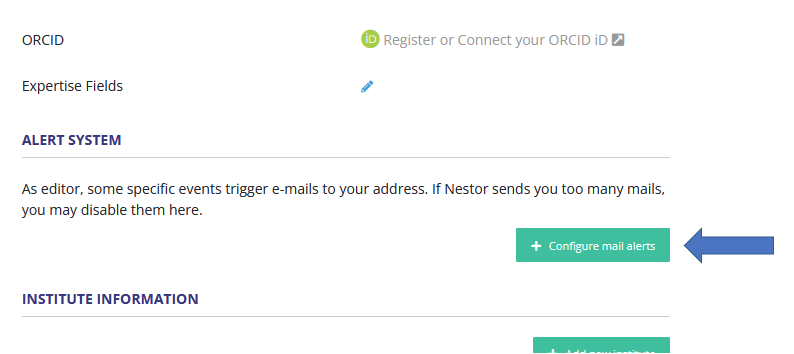
##### **The system sends me too many e-mails, how I can I disable them?**

E-mail alerts can be disabled via your personal account. <span class="TextRun SCXW14624660 BCX0" data-contrast="auto" lang="EN-US" style="margin: 0px; padding: 0px; user-select: text; -webkit-user-drag: none; -webkit-tap-highlight-color: transparent; font-variant-ligatures: none !important; font-size: 11pt; line-height: 19.425px; font-family: Calibri, Calibri_EmbeddedFont, Calibri_MSFontService, sans-serif;" xml:lang="EN-US">P<span class="NormalTextRun SCXW14624660 BCX0" style="margin: 0px; padding: 0px; user-select: text; -webkit-user-drag: none; -webkit-tap-highlight-color: transparent;">lease click on your name and on ‘My profile’</span><span class="NormalTextRun SCXW14624660 BCX0" style="margin: 0px; padding: 0px; user-select: text; -webkit-user-drag: none; -webkit-tap-highlight-color: transparent;">:</span></span>

<span class="TextRun SCXW14624660 BCX0" data-contrast="auto" lang="EN-US" style="margin: 0px; padding: 0px; user-select: text; -webkit-user-drag: none; -webkit-tap-highlight-color: transparent; font-variant-ligatures: none !important; font-size: 11pt; line-height: 19.425px; font-family: Calibri, Calibri_EmbeddedFont, Calibri_MSFontService, sans-serif;" xml:lang="EN-US"><span class="NormalTextRun SCXW14624660 BCX0" style="margin: 0px; padding: 0px; user-select: text; -webkit-user-drag: none; -webkit-tap-highlight-color: transparent;"><span class="WACImageContainer NoPadding BlobObject SCXW14624660 BCX0" role="presentation" style="margin: 0px; padding: 0px; user-select: text; -webkit-user-drag: none; -webkit-tap-highlight-color: transparent; position: relative; cursor: move; left: 0px; top: 2px; display: inline-block; text-indent: 0px; width: 306px; height: 131px; transform: rotate(0deg);">![](https://doc.nestor-edp.org/uploads/images/gallery/2023-01/WSNxySLGhg1bSHKE-embedded-image-bcpwsizs.png)</span></span></span>

From there, go the Alert System:

<table border="1" id="bkmrk--11" style="border-collapse: collapse; width: 100%;"><colgroup><col style="width: 99.8765%;"></col></colgroup><tbody><tr><td>[![image.png](https://doc.nestor-edp.org/uploads/images/gallery/2023-05/scaled-1680-/KpJcYlk8rIjC3iXd-image.png)](https://doc.nestor-edp.org/uploads/images/gallery/2023-05/KpJcYlk8rIjC3iXd-image.png)</td></tr></tbody></table>

---

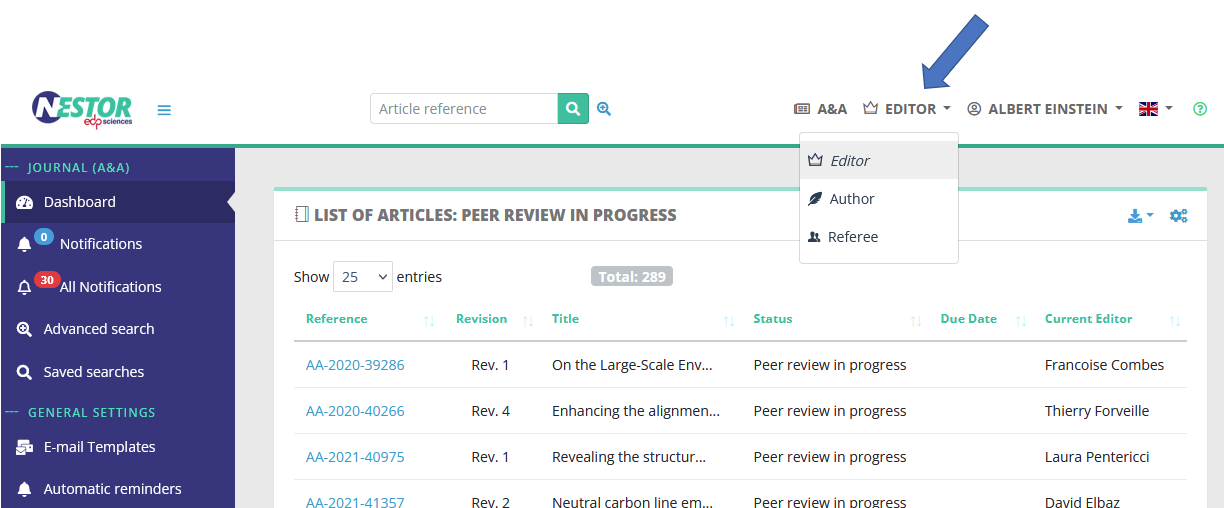
##### **I want to submit a paper myself, how can I reach the author interface?**

By default, Nestor will log you as editor. If you want to submit a paper where you are the author, you must switch your role! This is done here:

[![image.png](https://doc.nestor-edp.org/uploads/images/gallery/2023-05/scaled-1680-/0IAitCBoT5wxXazt-image.png)](https://doc.nestor-edp.org/uploads/images/gallery/2023-05/0IAitCBoT5wxXazt-image.png)