Editor assignment and responsibility
This section details the assigment process and the concepts related to editorial responsibility: - Who is the current editor of an article, what are the consequences? - Who is the editor in charge? - How does editorial responsability switch from an editor to another?
- Assigning editors
- Current editor and to-do list
- Editor in charge and personal dashboard
- How does editorial responsibility switch?
Assigning editors
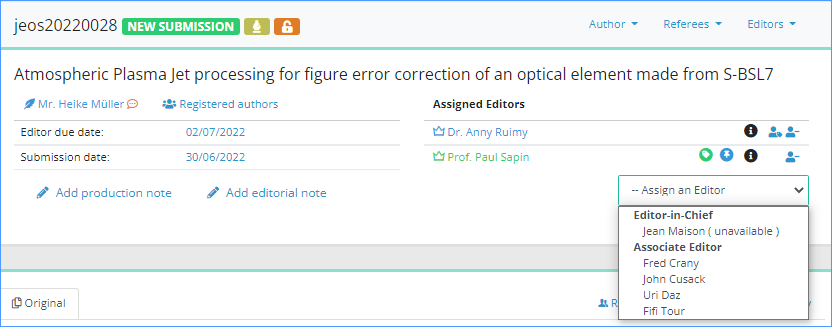
If you are an Editor-in-Chief, you will likely assign articles to other editors (e.g. Associate Editors, Guest Editors, etc.). Click on the ‘Assign an Editor’ menu and select the editor you want to assign. This opens the confirmation window, proposing you assignment e-mails:
|
Once you confirm sending the message, the following happens:
|
Additionally:
- if the article status was "Awaiting assignment"
- --> status changes to "New submission"
- if the assigned editor has a chargeable profile
- -->Nestor will also consider him as "editor in charge", which impacts his personal dashboard
Current editor & editor in charge
In the article:
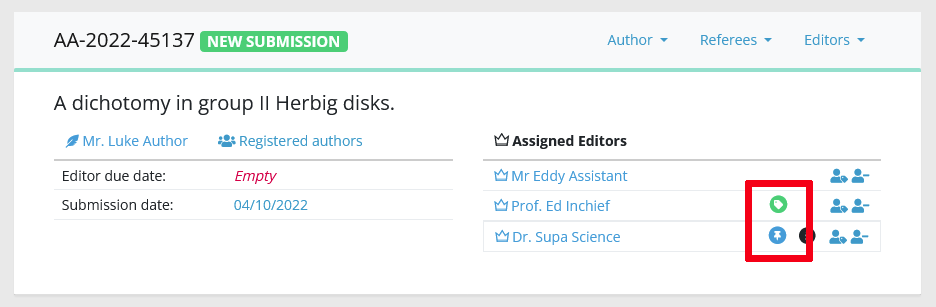
- The "current editor" is highlighted with a green badge
- The "editor in charge" is highlighted with a blue badge
On a given article, there can be only one editor in charge, and one current editor. The same person can hold the two responsibilities at the same time.
In fact most of the time, the scientific editor is both "current" and "in charge". Depending on your workflow, this can change later on in the process. For example:
- The editor in charge proposes an acceptance to the Editor-in-Chief: the EIC is now current.
- The EIC accepts the article and pass it on to a copy editor, the copy editor is now current.
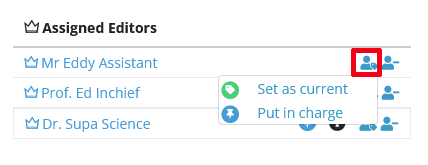
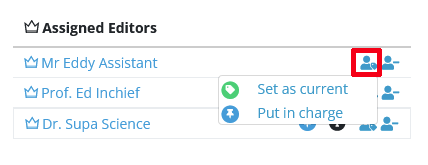
If necessary, editorial responsibility may be easily corrected with this tool:
Current editor and to-do list
The current editor is responsible for moving an article forward:
- The current editor is the default recipient of workflow notifications (eg referees declining, uploading a report etc)
- If an editorial action is expected (such as an assignment or a decision), the current editor is responsible for performing this action
- If an author or referee action is expected, the current editor is responsible for following through and remind the latecomers
In any event, the current editor is responsible of the timely processing of the manuscript, and make sure the workflow is not stuck.
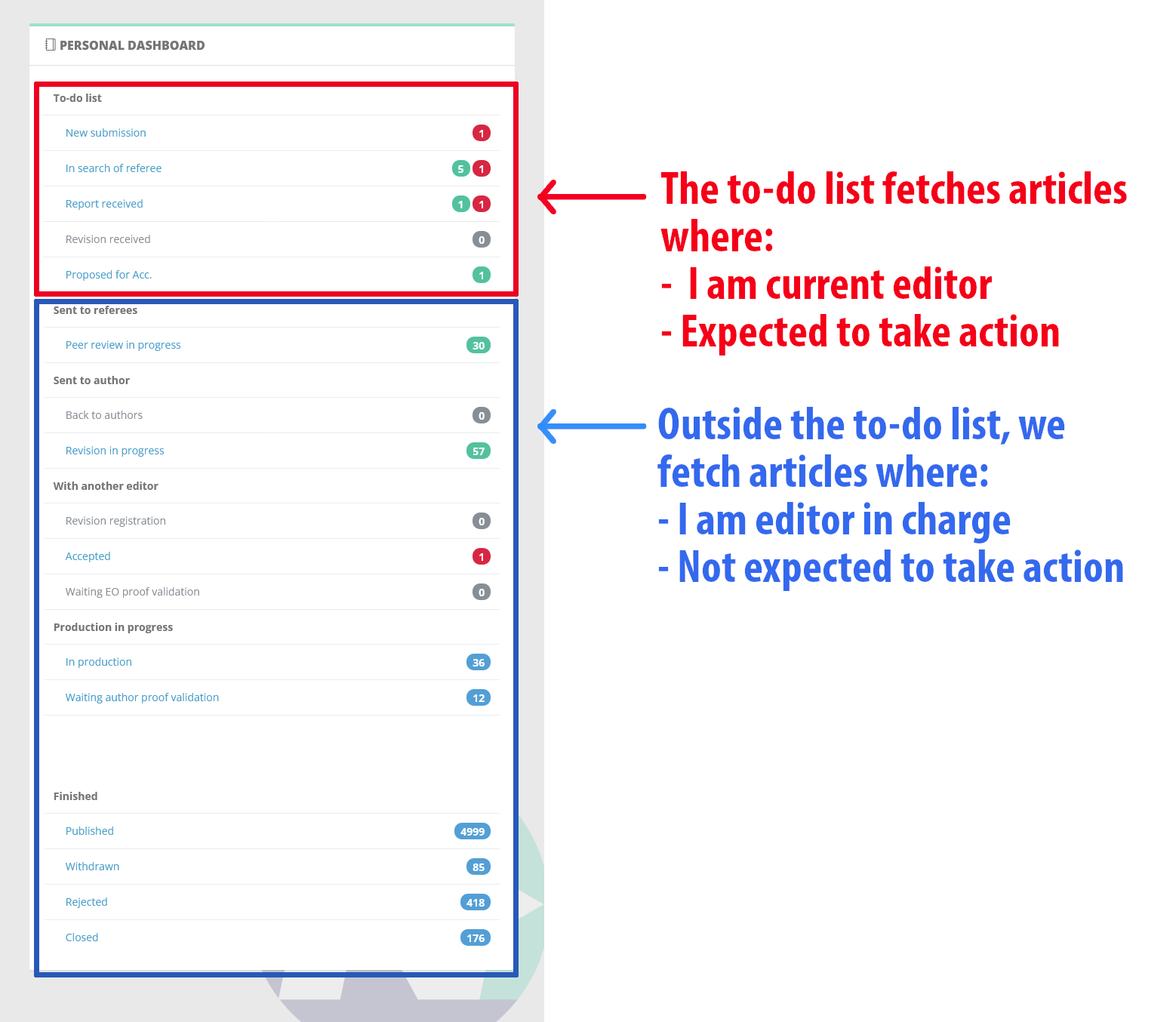
For this purpose, your personal to-do list keeps track of articles where you are current editor:
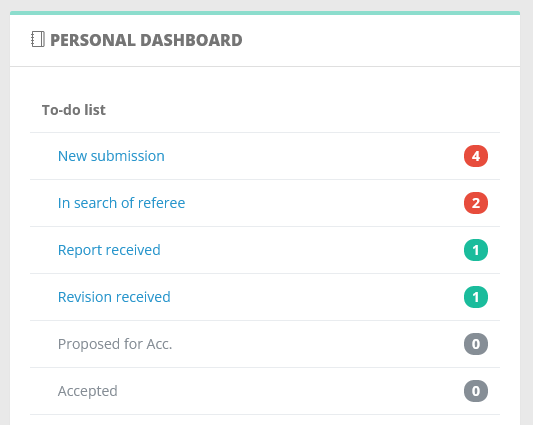
The to-do list helps you identify articles where an action is expected from you. NB Red counters keep track of articles where the due date is passed, please pay particular attention to them.
Editor in charge and personal dashboard
The editor in charge of a manuscript is responsible of the scientific evaluation, oversee the review process, and proposes the final decision. Contrary to the current editor, the editor in charge remains the same throughout the life of the article.
Let us consider the following examples:
- The editor in charge recommends acceptance to his Editor-in-Chief: the EIC is now current.
- The EIC accepts the article and pass it on to a copy editor, the copy editor is now current.
- Meanwhile, the editor in charge remained the same.
The editor in charge notion serves two purposes:
- Keeping track of who handled the scientific workload on an article (which is useful for searches, exports and statistics)
- Displaying relevant articles in one's personal dashboard (below, in blue):
How does editorial responsibility switch?
For a given article, editorial responsibility is indicated by the colored tags in the assignment module. Note that the editor in charge and the current editor can be the same person! In fact, this will be the case for most of the article life.
Becoming the "current editor"
Any editor assigned to an article immediately gets the green tag "current editor", and is responsible for moving the article forward. If you are current editor, this means:
- the article will now appear in your to-do list
- the article will disappear from any other editor to-do list
- your role is to make sure the editorial process moves forward ಠ_ಠ
Besides the standard switch described above, a proposal from an editor to his parent editor will also switch the responsibility: the parent editor will become "current", usually to take the final decision on the article.
Becoming the "editor in charge"
An editor gets the blue tag "editor in charge" when these conditions are fulfilled:
- the editor must be assigned to the article
- when assigned, his/her profile must be "chargeable" (see profile configuration).
Becoming editor in charge means you are now responsible of the scientific evaluation (ง •̀_•́)ง
Also, the article will appear in your personal dashboard (provided it is not already in your to-do list!).
Correcting the editorial responsibility
Correcting the responsibility is straightforward, but your editor profile must allow you to do it! Correcting the editorial responsibility will impact the other editors' dashboards as described above. This is useful to ensure an article is being followed properly by the most relevant editor.